Vendors Verified
Streamlining SaaS Procurement
Visual Design
User Experience
SaaS

Role & Timeline
Role & Timeline
Timeline
Timeline
Oct 2024 - Dec 2024
Oct 2024 - Dec 2024
MY role
MY role
UI/UX Designer
UI/UX Designer
Project Overview
Vendors Verified is a SaaS management platform designed to help companies streamline software procurement, vendor communication, and contract tracking.
Problem Statement
The client faced significant challenges in managing their SaaS vendors due to reliance on scattered spreadsheets and email threads. This fragmented approach made it difficult to track product offerings, maintain customer relationships, and stay updated on contract changes. As their operations grew, so did the complexity of managing multiple vendors, leading to inefficiencies, missed renewals, and lack of visibility. They needed a centralized platform to streamline product catalog management, monitor contracts, and maintain clear communication with customers and vendors alike.
Design Scope
Initially, I was tasked with creating wireframes for the platform. However, due to bandwidth constraints, these were handed off to a fellow designer, who attended the initial stakeholder meetings. Based on feedback from these discussions, I focused on refining and finalizing the high-fidelity UI designs.
The application has two distinct user sections:
Admin Side:
Catalogue: For adding and modifying products.
Customers: For adding customers and managing quote requests.
Requests: For handling contract update and cancellation requests.
Client Side:
Contracts: For managing contracts.
Requests: For submitting contract update/cancellation requests to the admin.
User Management: For adding or modifying users.
Support: For submitting support inquiries to the admin.
Admin - Managing Product Catalog
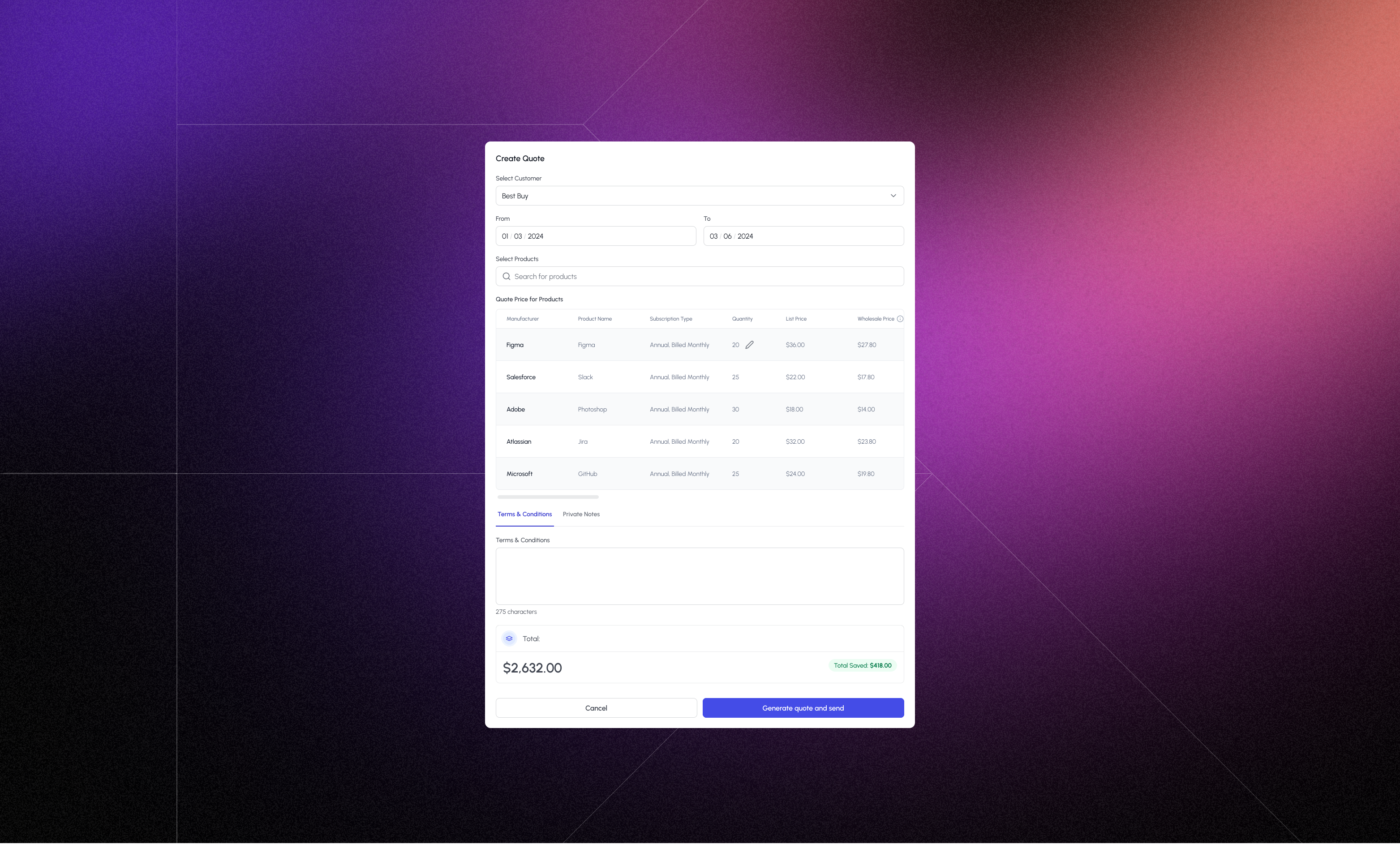
One of the client’s primary concerns was the ability to manage their existing product catalog efficiently. They wanted to import a pre-existing list of SaaS products into the platform and use that list to send quote requests to clients directly from the catalog page. To support this, I designed a streamlined flow initiated through a dialog box that included input fields for selecting the client, defining the contract period, and choosing products. Once products were selected, a dynamic table appeared below to input the number of licenses and admin-defined pricing for each item. Additional fields allowed the admin to add terms and conditions and private notes tailored to each quote. At the bottom of the dialog, the total amount was calculated automatically, highlighting the savings offered — helping clients clearly understand the value of the proposal before making a decision.
As part of designing various modules for the product, one key stakeholder requirement was to ensure a smoother onboarding process that reduces user drop-off and frustration. To improve the onboarding experience, I focused on clarity and transparency:
Step Indicator on Desktop:
I introduced a clear, visual step indicator on desktop resolutions, showing users how many steps were involved in the onboarding process.Purpose:
This helped set expectations early, reduced anxiety around completion time, and made the process feel more manageable.
Admin - Customer Management
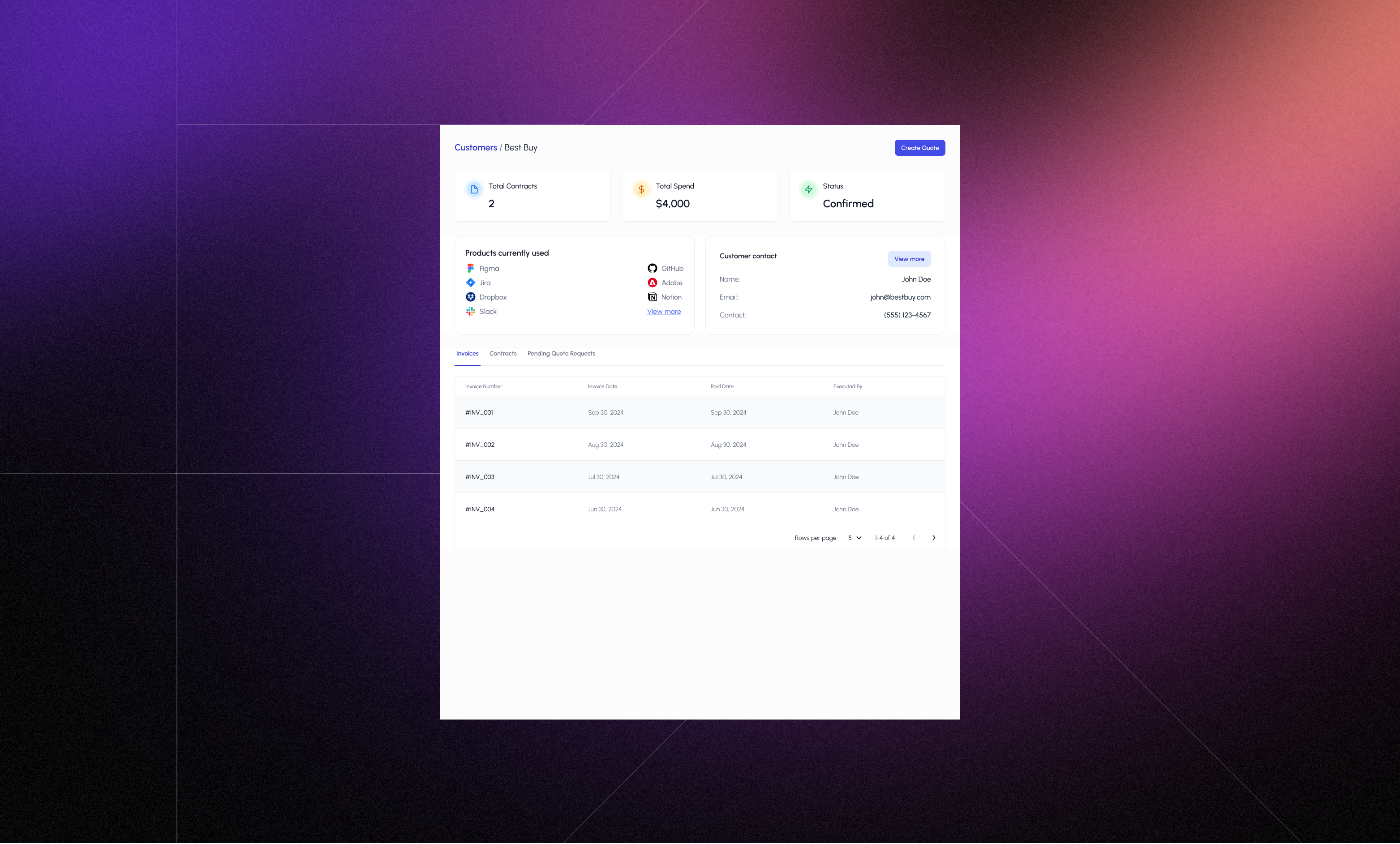
Another major concern for the client was the ability to efficiently manage their customer base within the platform. To address this, I designed a customer list view using a table that displayed key customer information at a glance. Since the client was in the early stages and didn’t have a large customer base, I intentionally did not include a search bar or filters in the initial release to keep the interface clean and focused.
Clicking on a customer row opened a client details page, which displayed important metrics such as the number of active contracts, total spend, client status, currently used products, and contact information. Below this, I added structured tables to organize Invoices, Active Contracts, and Pending Contract Requests, giving the admin a clear, consolidated view of all client interactions and financial activity.
Designing the Make Reservation flow was a key stakeholder requirement. The goal was to ensure users could easily focus on the discounted fuel price, quickly understand the amenities offered, and clearly see their potential savings—all without overwhelming them.
To balance clarity and detail, I designed two components:
Compact View:
Displays discounted price, original price, and key amenities (like parking, shower, food, etc.).
Designed to help users quickly scan multiple options.
Expanded View:
Includes everything from the compact view.
Adds an action button to make a reservation.
Shows truck stop contact details.
Admin - Managing Requests
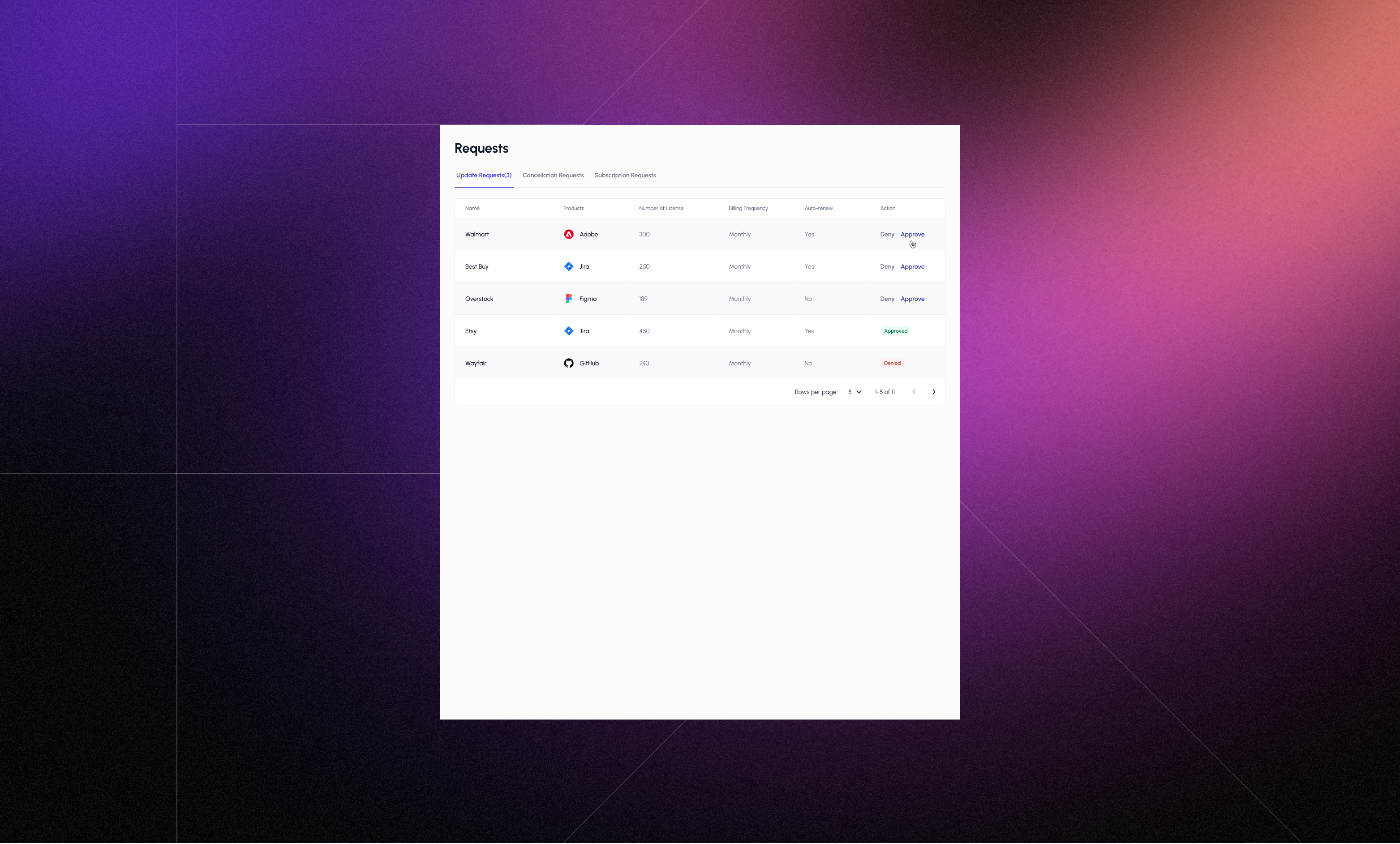
A key client requirement was to provide a way to handle various customer-initiated requests, including new subscription requests, contract update requests, and cancellation requests. To support this, I designed a dedicated admin interface with separate tables for each request type, keeping the experience organized and easy to navigate.
To streamline the workflow, I included clear action buttons within each row, enabling the admin to approve or deny requests directly from the table view. This reduced the number of clicks needed and made the review process more efficient. For contract update and new subscription requests, clicking Approve opened a dialog box for sending a quote request, allowing the admin to complete the process without navigating away from the current screen. This dialog included inputs for client selection, contract period, selected products, pricing, license count, and additional fields for terms and private notes — ensuring a smooth transition from request to quote.
A key client requirement was to provide a way to handle various customer-initiated requests, including new subscription requests, contract update requests, and cancellation requests. To support this, I designed a dedicated admin interface with separate tables for each request type, keeping the experience organized and easy to navigate.
To streamline the workflow, I included clear action buttons within each row, enabling the admin to approve or deny requests directly from the table view. This reduced the number of clicks needed and made the review process more efficient. For contract update and new subscription requests, clicking Approve opened a dialog box for sending a quote request, allowing the admin to complete the process without navigating away from the current screen. This dialog included inputs for client selection, contract period, selected products, pricing, license count, and additional fields for terms and private notes — ensuring a smooth transition from request to quote.
Admin - Notifications
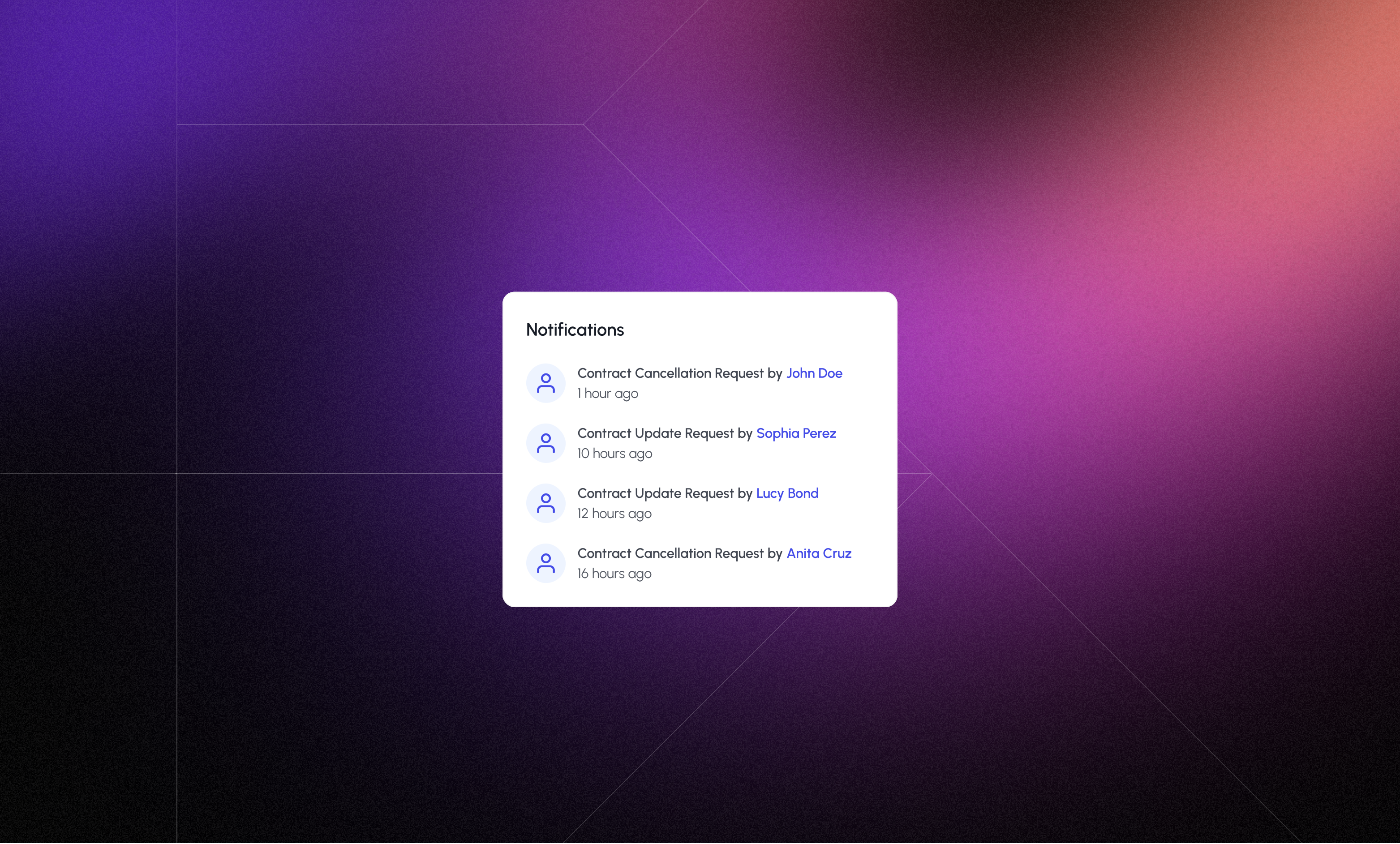
To help the admin stay informed about customer activity without needing to constantly check the Requests page, I designed a notification panel that surfaces real-time updates about incoming actions. This panel displays notifications for key events such as new subscription requests, contract updates, and cancellation requests submitted by customers.
The design focused on simplicity and visibility — ensuring that admins could quickly scan recent activity and take action when needed. Notifications are accessible from the top navigation bar, allowing admins to stay up to date without breaking their workflow.
To help the admin stay informed about customer activity without needing to constantly check the Requests page, I designed a notification panel that surfaces real-time updates about incoming actions. This panel displays notifications for key events such as new subscription requests, contract updates, and cancellation requests submitted by customers.
The design focused on simplicity and visibility — ensuring that admins could quickly scan recent activity and take action when needed. Notifications are accessible from the top navigation bar, allowing admins to stay up to date without breaking their workflow.
Customer - Managing Contracts
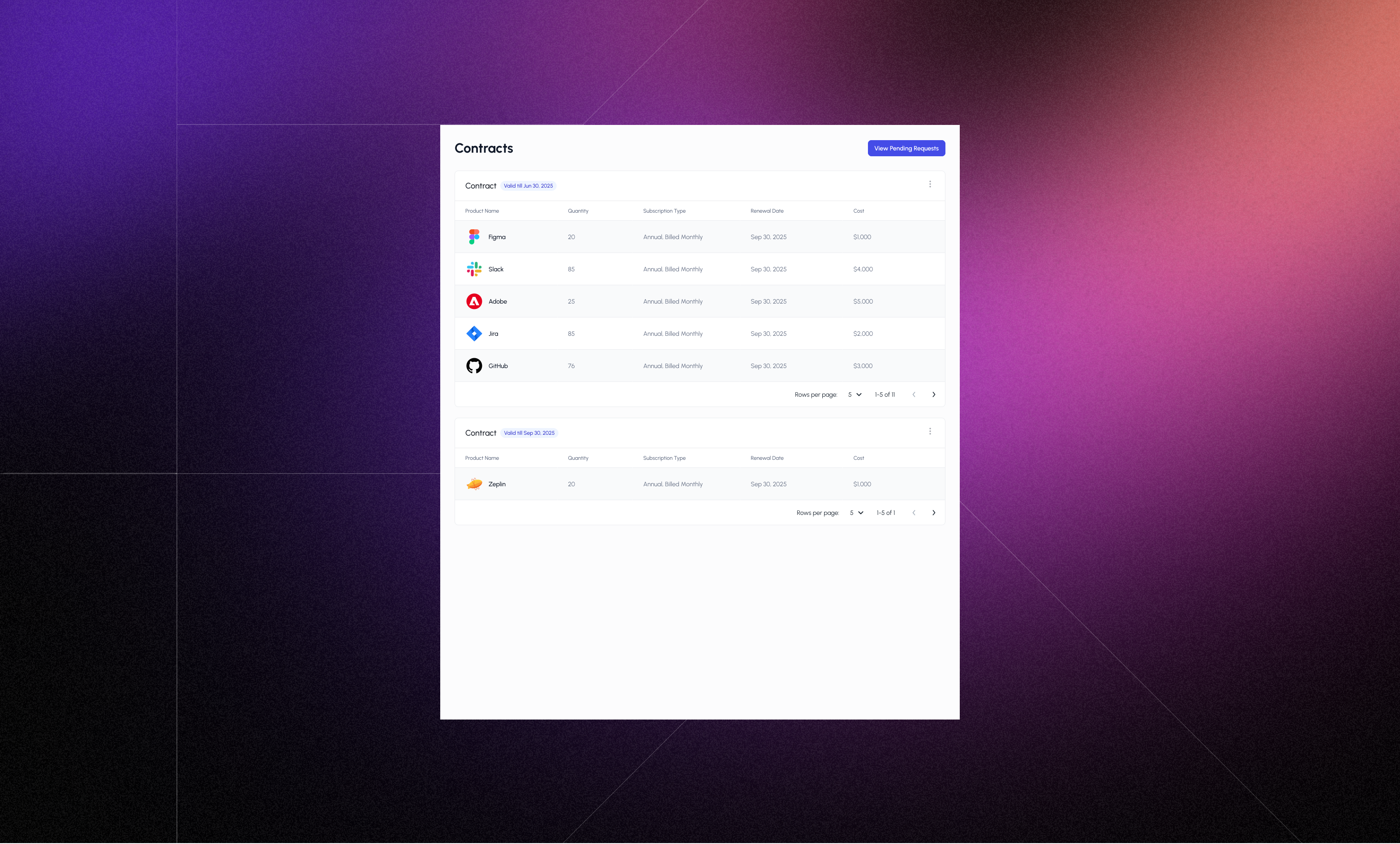
Managing contracts from the customer's perspective was an essential requirement for the client. The goal was to give customers a clear, organized view of their active and new contracts to promote transparency and self-service.
To achieve this, I designed a contract overview section that displayed existing contracts in a structured table format.
To differentiate between ongoing and newly offered contracts, new contracts were shown in a separate table below the active contracts. This allowed customers to quickly identify which contracts required their attention and which ones were already in use. Additionally, a "View Pending Requests" button was included at the top of the section. Clicking this navigated users to a dedicated page where they could approve or view quote requests sent by the admin — such as for new subscriptions or contract updates.
Managing contracts from the customer's perspective was an essential requirement for the client. The goal was to give customers a clear, organized view of their active and new contracts to promote transparency and self-service.
To achieve this, I designed a contract overview section that displayed existing contracts in a structured table format.
To differentiate between ongoing and newly offered contracts, new contracts were shown in a separate table below the active contracts. This allowed customers to quickly identify which contracts required their attention and which ones were already in use. Additionally, a "View Pending Requests" button was included at the top of the section. Clicking this navigated users to a dedicated page where they could approve or view quote requests sent by the admin — such as for new subscriptions or contract updates.
Customer - Contract Details
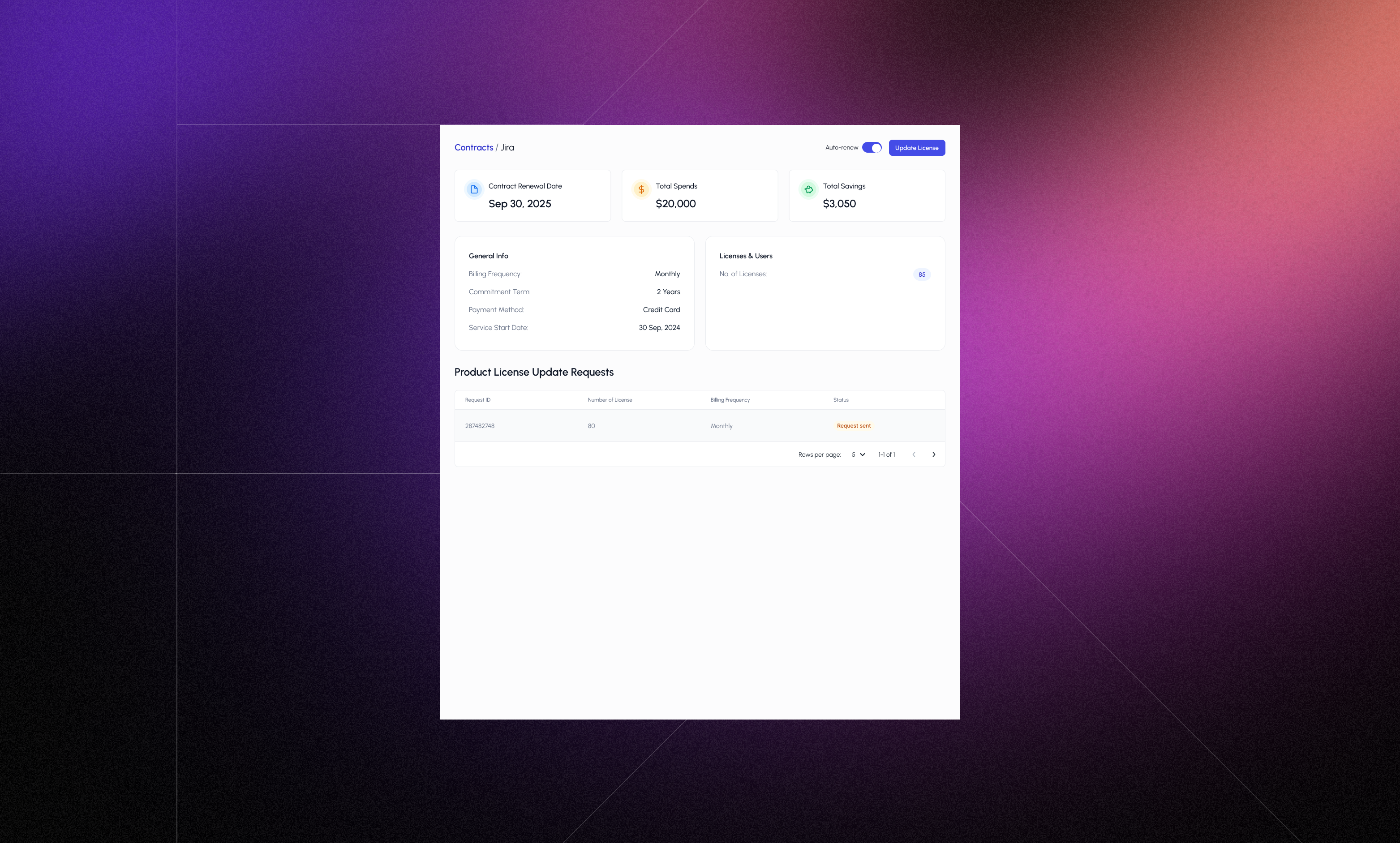
To provide customers with deeper insight into their subscriptions, I designed a Contract Details page that users are navigated to upon clicking any row in the contract table. I designed few components to clearly display key contract information such as the renewal date, total spend, total savings, general information such as billing frequency, contract period, payment method, service start date, and number of licenses to give users a quick sense of value and timing. In addition, to provide transparency into ongoing updates, a table listing contract update requests specific to that product was shown below. This table displayed the status of each request allowing users to track the progress of any changes they had requested. Also I introduced the ability for customers to disable auto-renewal directly from this page. When toggled off, this action would notify the admin that the customer does not wish to continue the contract for that product in the upcoming renewal cycle. This small yet impactful addition gave users more control over their subscriptions while helping the admin plan renewals and follow-ups accordingly.
To provide customers with deeper insight into their subscriptions, I designed a Contract Details page that users are navigated to upon clicking any row in the contract table. I designed few components to clearly display key contract information such as the renewal date, total spend, total savings, general information such as billing frequency, contract period, payment method, service start date, and number of licenses to give users a quick sense of value and timing. In addition, to provide transparency into ongoing updates, a table listing contract update requests specific to that product was shown below. This table displayed the status of each request allowing users to track the progress of any changes they had requested. Also I introduced the ability for customers to disable auto-renewal directly from this page. When toggled off, this action would notify the admin that the customer does not wish to continue the contract for that product in the upcoming renewal cycle. This small yet impactful addition gave users more control over their subscriptions while helping the admin plan renewals and follow-ups accordingly.
Customer - Requests & User Management
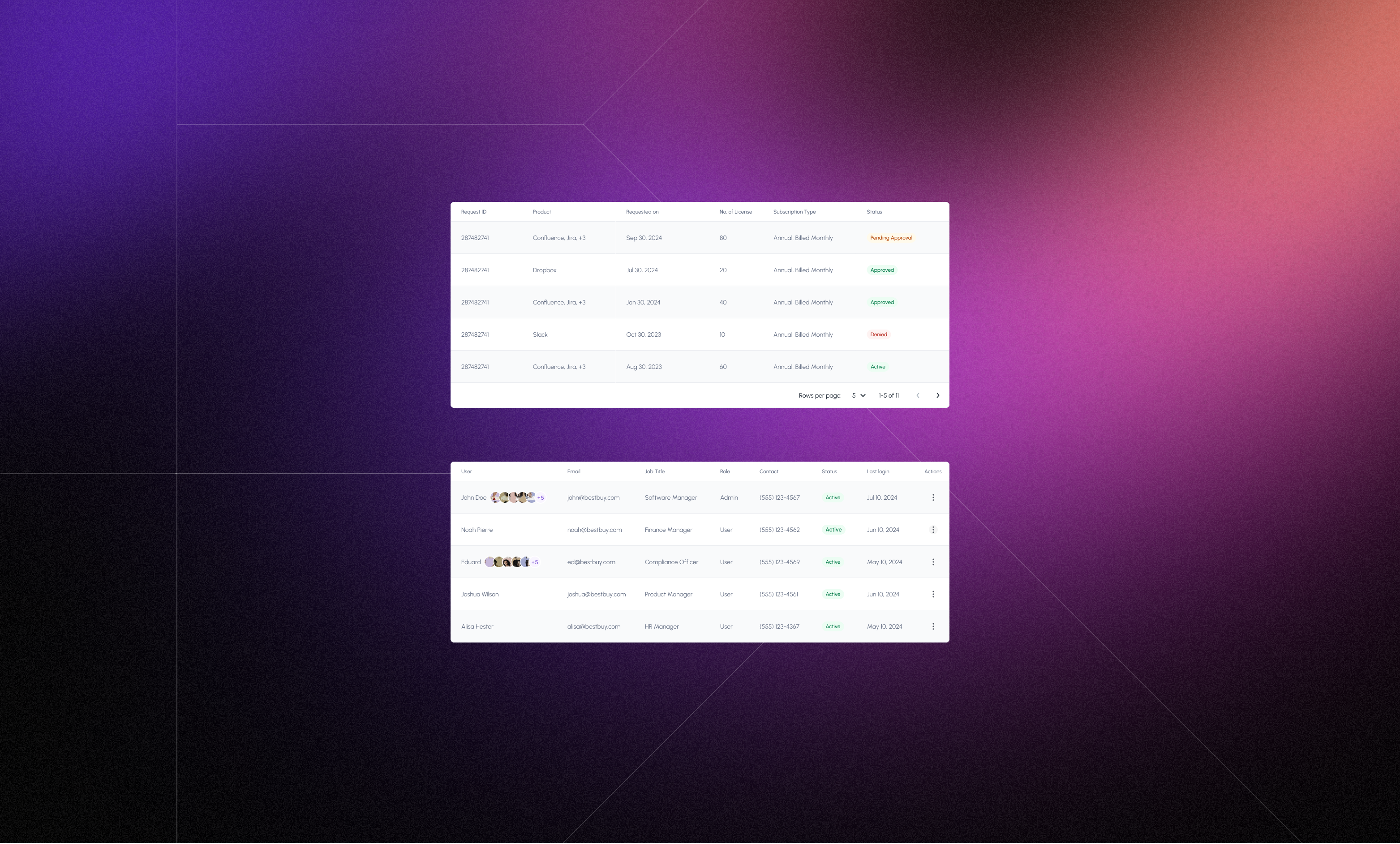
The Requests & User Management page was designed to serve two distinct but essential functions: managing customer requests and handling user access within customer organizations.
On the requests side, the page displays requests initiated by customers to the admin. To keep things organized and easy to act on, I designed separate tables for each request type — one for contract update requests and another for cancellation requests. Each table clearly presented the request type, customer details, related product, date, and current status, enabling the admin to review and respond efficiently.
For user management, the platform supports organizations with multiple users. To address this, I created dedicated tables for customer-side admins and customer-side users. The customer-side admin has full control over user management, including the ability to invite new users, assign primary and secondary contacts, edit user details, and remove users when necessary. The customer-side user, on the other hand, sees the same table view for transparency but without access to administrative actions, ensuring a clear distinction in roles and permissions while maintaining visibility across the team.
The Requests & User Management page was designed to serve two distinct but essential functions: managing customer requests and handling user access within customer organizations.
On the requests side, the page displays requests initiated by customers to the admin. To keep things organized and easy to act on, I designed separate tables for each request type — one for contract update requests and another for cancellation requests. Each table clearly presented the request type, customer details, related product, date, and current status, enabling the admin to review and respond efficiently.
For user management, the platform supports organizations with multiple users. To address this, I created dedicated tables for customer-side admins and customer-side users. The customer-side admin has full control over user management, including the ability to invite new users, assign primary and secondary contacts, edit user details, and remove users when necessary. The customer-side user, on the other hand, sees the same table view for transparency but without access to administrative actions, ensuring a clear distinction in roles and permissions while maintaining visibility across the team.
Customer - Support
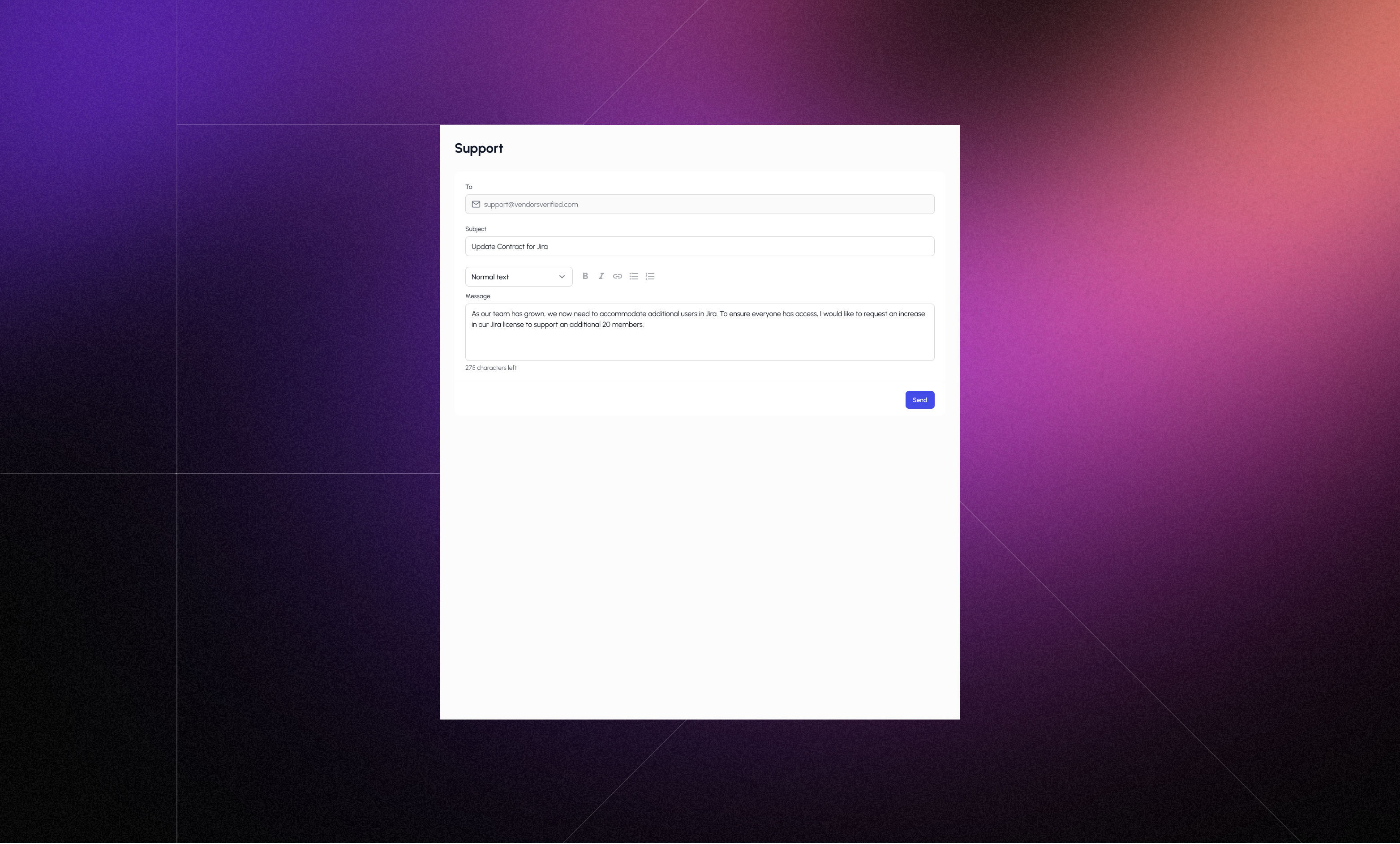
The Support Page was introduced based on a client requirement to simplify customer communication by allowing users to raise concerns or issues directly within the platform—eliminating the need to rely on third-party tools like email or chat platforms.
To support this, I designed a straightforward and user-friendly form that included input fields for showing the recipient, entering a subject, and composing a message using a rich text editor. The rich text editor enabled customers to format their messages clearly, attach references, or highlight specific issues, improving clarity for the admin reviewing the concern.
The Support Page was introduced based on a client requirement to simplify customer communication by allowing users to raise concerns or issues directly within the platform—eliminating the need to rely on third-party tools like email or chat platforms.
To support this, I designed a straightforward and user-friendly form that included input fields for showing the recipient, entering a subject, and composing a message using a rich text editor. The rich text editor enabled customers to format their messages clearly, attach references, or highlight specific issues, improving clarity for the admin reviewing the concern.
Outcomes
The final design received positive feedback from both the client and the development team. Stakeholders appreciated the clarity, structure, and usability of the interfaces, which aligned well with their workflows and business needs. The design effectively addressed key pain points around request management, contract visibility, and customer communication. Developers also found the components to be well-organized and implementation-friendly, which helped speed up the development process and ensured consistency across the platform.
The final design received positive feedback from both the client and the development team. Stakeholders appreciated the clarity, structure, and usability of the interfaces, which aligned well with their workflows and business needs. The design effectively addressed key pain points around request management, contract visibility, and customer communication. Developers also found the components to be well-organized and implementation-friendly, which helped speed up the development process and ensured consistency across the platform.
ADMIN AUhtentication

ADMIN SCREENS

customer AUhtentication

Customer SCREENS


Let's build something together!
Crafted with ☕️ and 🎧
Lights on·off