Fuel Buyers Club

Helping truck drivers save on

fuel.

Visual Design

User Experience

Role & Timeline

Role & Timeline

Timeline

Timeline

Oct 2024 - Dec 2024

Oct 2024 - Dec 2024

MY role

MY role

UI/UX Designer

UI/UX Designer

Project Overview

Fuel Buyers Club is a web-based application that enables truck drivers to reserve fuel at discounted rates by booking at specific truck stops.

Problem Statement

Truck drivers often face challenges in finding cost-effective fueling options. They also struggle with cumbersome processes for availing discounts, leading to missed savings and low adoption of available offers.

Design Scope

I was entrusted with complete ownership of the application's design modules. The client provided clear wireframes, which streamlined my task by offering well-defined requirements.

The application included the following modules:

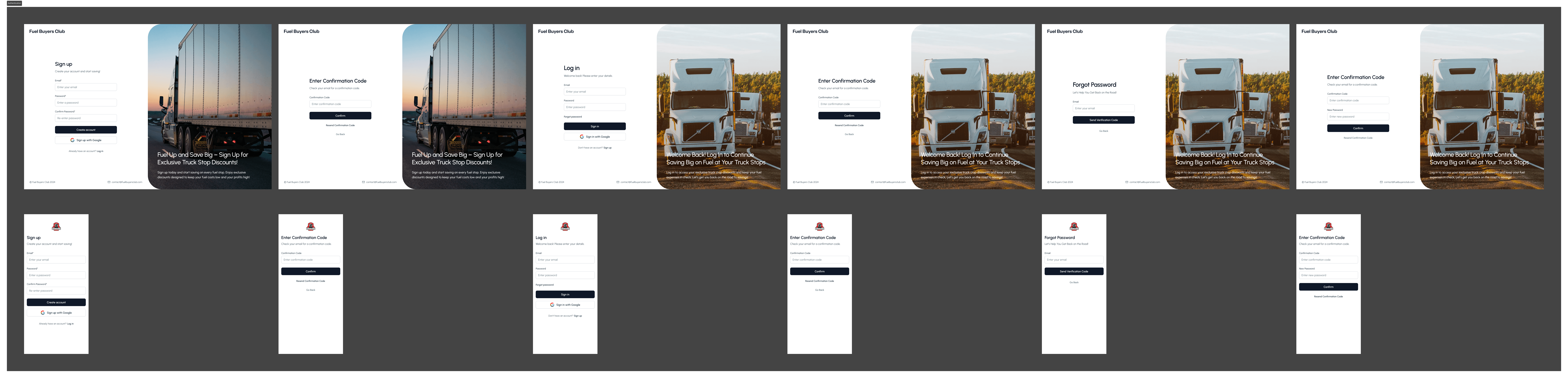
  1. Authentication: Secure user login and registration.

  2. User Onboarding: Guides new users to input vehicle, bank account, and personal details for a seamless start.

  3. Make Reservation: Allow users to reserve truck stops to avail of fuel discounts.

  4. Past Reservations: Enable users to view their booking history.

  5. Billing: Provide users with access to transaction details.

  6. User Profile: Let users manage their vehicle, bank account, and personal information.

User-Centric Approach

Truck drivers, the primary users of the application, span a wide age range. Designing for this diverse audience required a focus on simplicity and ease of use:

  • Younger Drivers (21–34 years): Often new to the profession, learning routes and vehicle types.

  • Mid-Age Drivers (35–54 years): Representing the largest group, these experienced drivers form the industry’s backbone.

  • Older Drivers (55+ years): Many continue working due to their passion or financial needs.

Given these considerations, I ensured that the interface was intuitive and minimized effort for users to accomplish tasks.

Truck drivers, the primary users of the application, span a wide age range. Designing for this diverse audience required a focus on simplicity and ease of use:

  • Younger Drivers (21–34 years): Often new to the profession, learning routes and vehicle types.

  • Mid-Age Drivers (35–54 years): Representing the largest group, these experienced drivers form the industry’s backbone.

  • Older Drivers (55+ years): Many continue working due to their passion or financial needs.

Given these considerations, I ensured that the interface was intuitive and minimized effort for users to accomplish tasks.

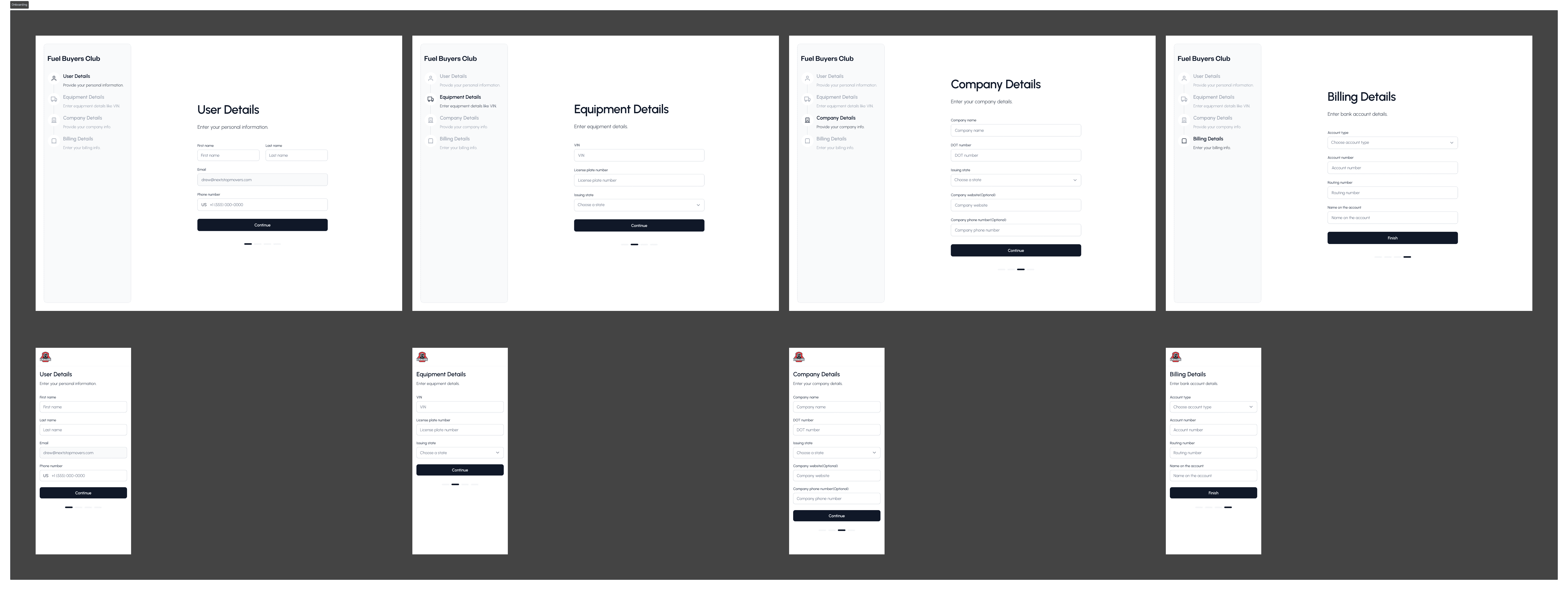
Onboarding Experience

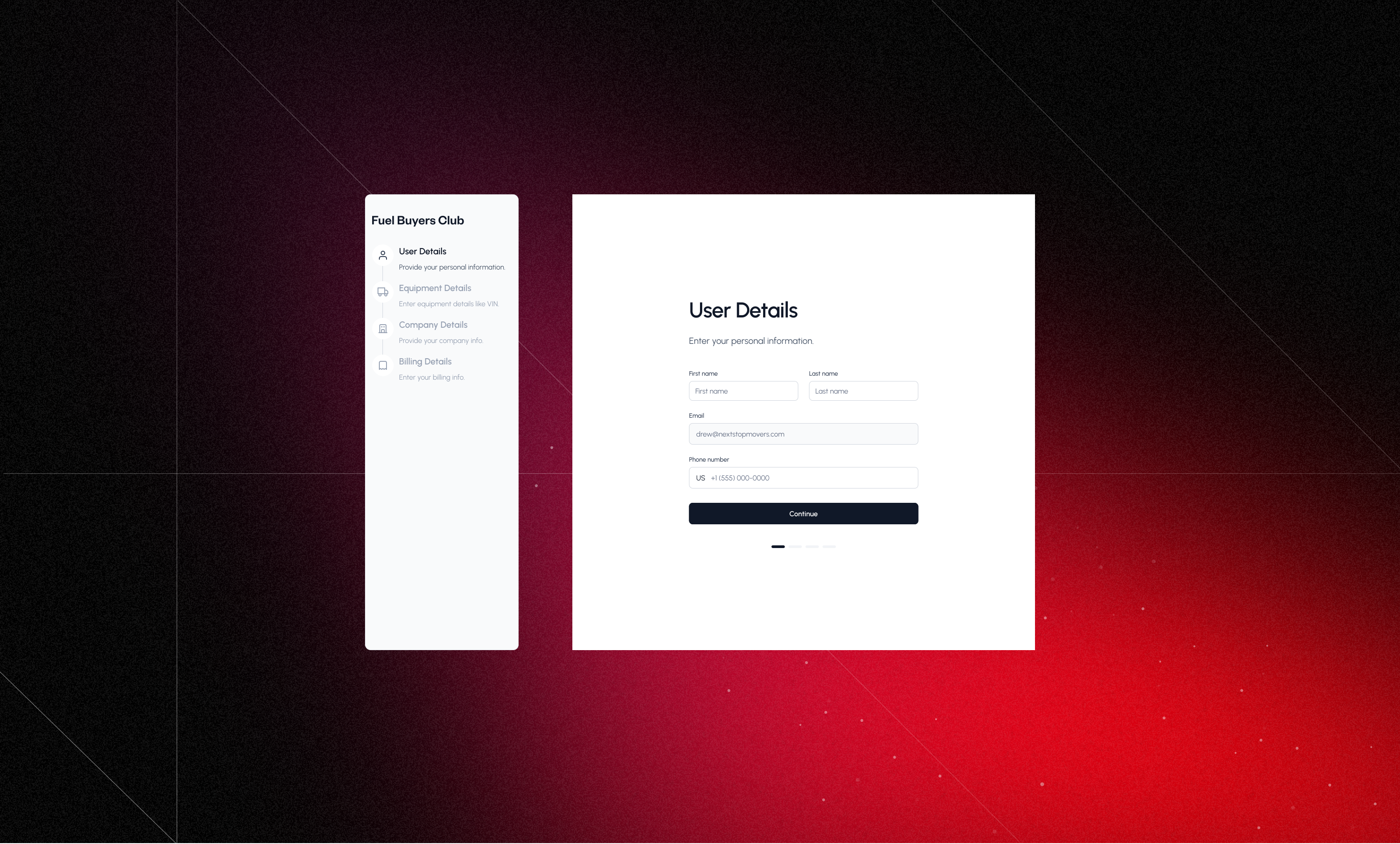
As part of designing various modules for the product, one key stakeholder requirement was to ensure a smoother onboarding process that reduces user drop-off and frustration. To improve the onboarding experience, I focused on clarity and transparency:

  • Step Indicator on Desktop:
    I introduced a clear, visual step indicator on desktop resolutions, showing users how many steps were involved in the onboarding process.

  • Purpose:
    This helped set expectations early, reduced anxiety around completion time, and made the process feel more manageable.


As part of designing various modules for the product, one key stakeholder requirement was to ensure a smoother onboarding process that reduces user drop-off and frustration. To improve the onboarding experience, I focused on clarity and transparency:

  • Step Indicator on Desktop:
    I introduced a clear, visual step indicator on desktop resolutions, showing users how many steps were involved in the onboarding process.

  • Purpose:
    This helped set expectations early, reduced anxiety around completion time, and made the process feel more manageable.

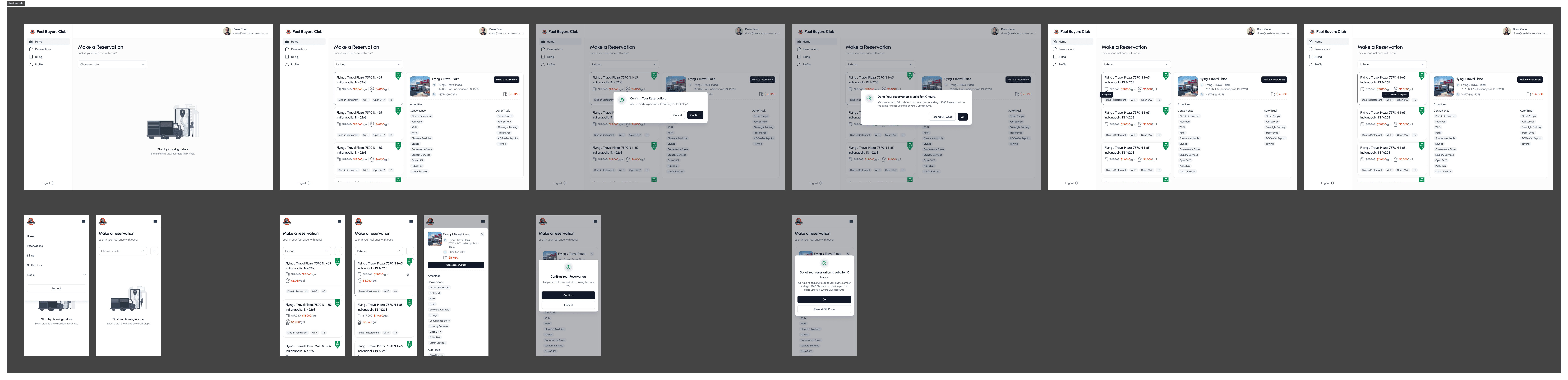
Make Reservation

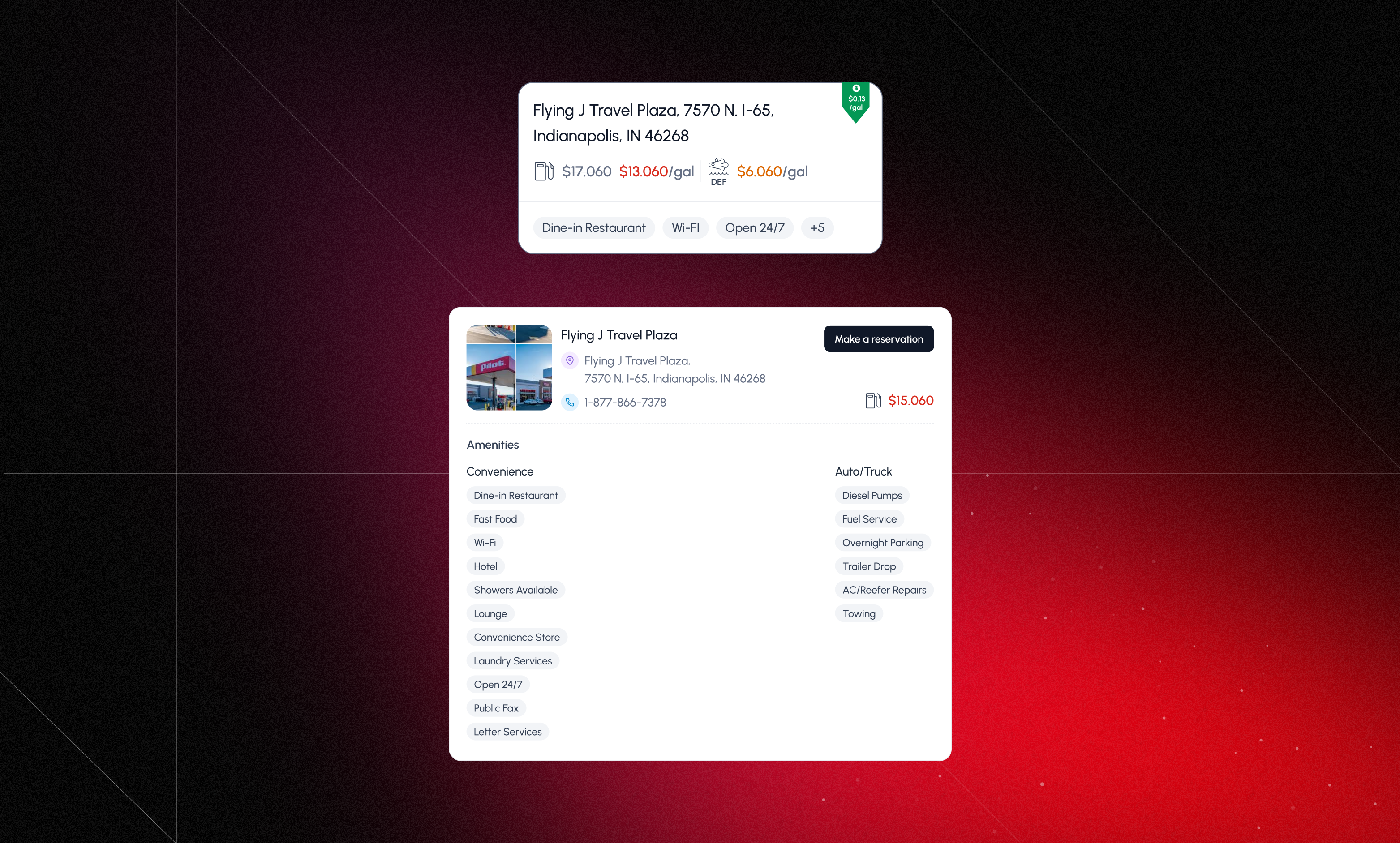
Designing the Make Reservation flow was a key stakeholder requirement. The goal was to ensure users could easily focus on the discounted fuel price, quickly understand the amenities offered, and clearly see their potential savings—all without overwhelming them.

To balance clarity and detail, I designed two components:

  1. Compact View:

    • Displays discounted price, original price, and key amenities (like parking, shower, food, etc.).

    • Designed to help users quickly scan multiple options.

  2. Expanded View:

    • Includes everything from the compact view.

    • Adds an action button to make a reservation.

    • Shows truck stop contact details.


Designing the Make Reservation flow was a key stakeholder requirement. The goal was to ensure users could easily focus on the discounted fuel price, quickly understand the amenities offered, and clearly see their potential savings—all without overwhelming them.

To balance clarity and detail, I designed two components:

  1. Compact View:

    • Displays discounted price, original price, and key amenities (like parking, shower, food, etc.).

    • Designed to help users quickly scan multiple options.

  2. Expanded View:

    • Includes everything from the compact view.

    • Adds an action button to make a reservation.

    • Shows truck stop contact details.

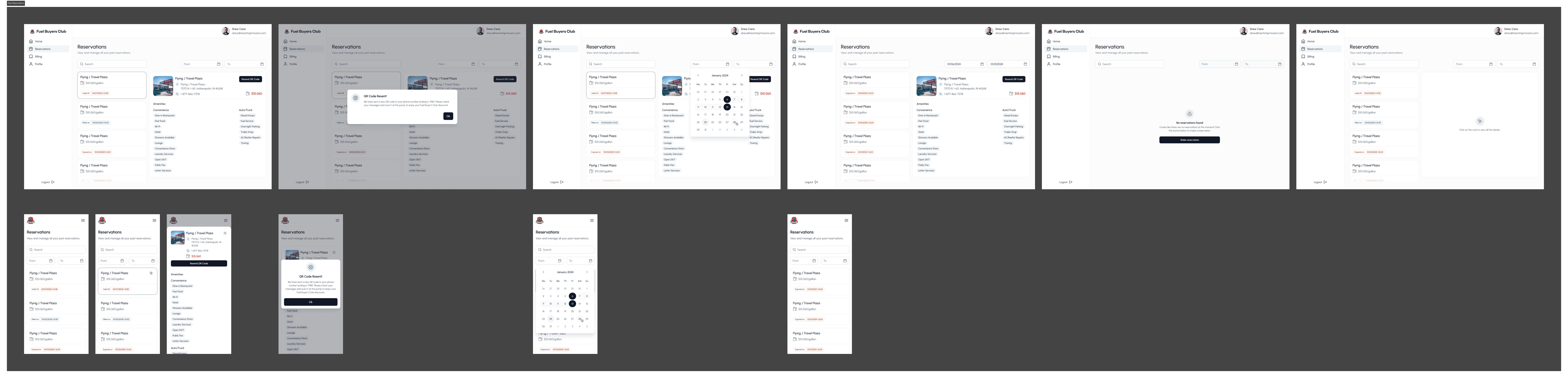
Past Reservations

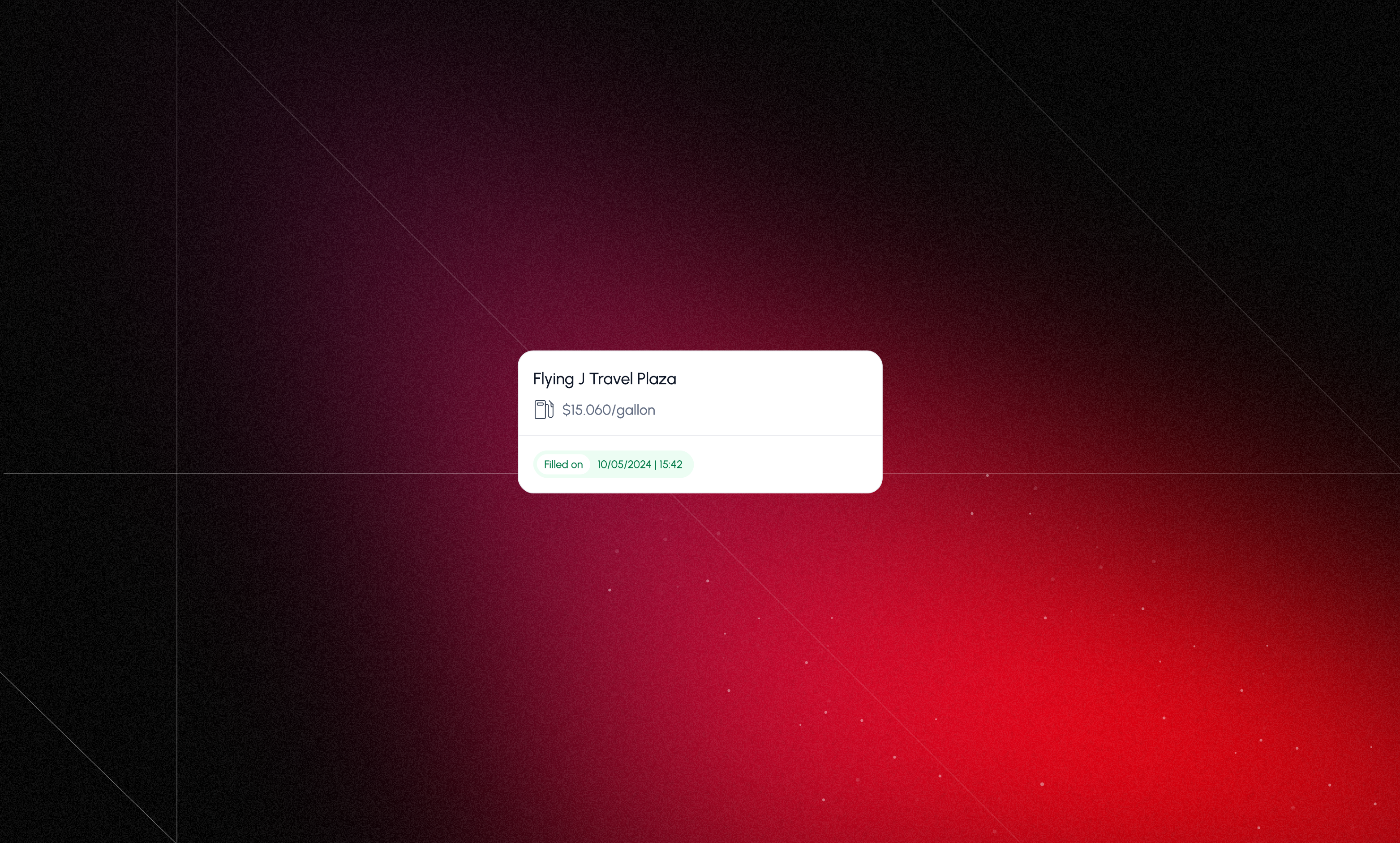
The Past Reservations needed to display key reservation details. Based on stakeholder input, the primary goals were to:

  • Clearly show the validity status of each reservation.

  • Allow users to resend the QR code sent to their mobile after a successful reservation.

  • Each reservation item included:

    • Reserved price and truck stop name

    • Validity status (active, expired, or used)

The Past Reservations needed to display key reservation details. Based on stakeholder input, the primary goals were to:

  • Clearly show the validity status of each reservation.

  • Allow users to resend the QR code sent to their mobile after a successful reservation.

  • Each reservation item included:

    • Reserved price and truck stop name

    • Validity status (active, expired, or used)

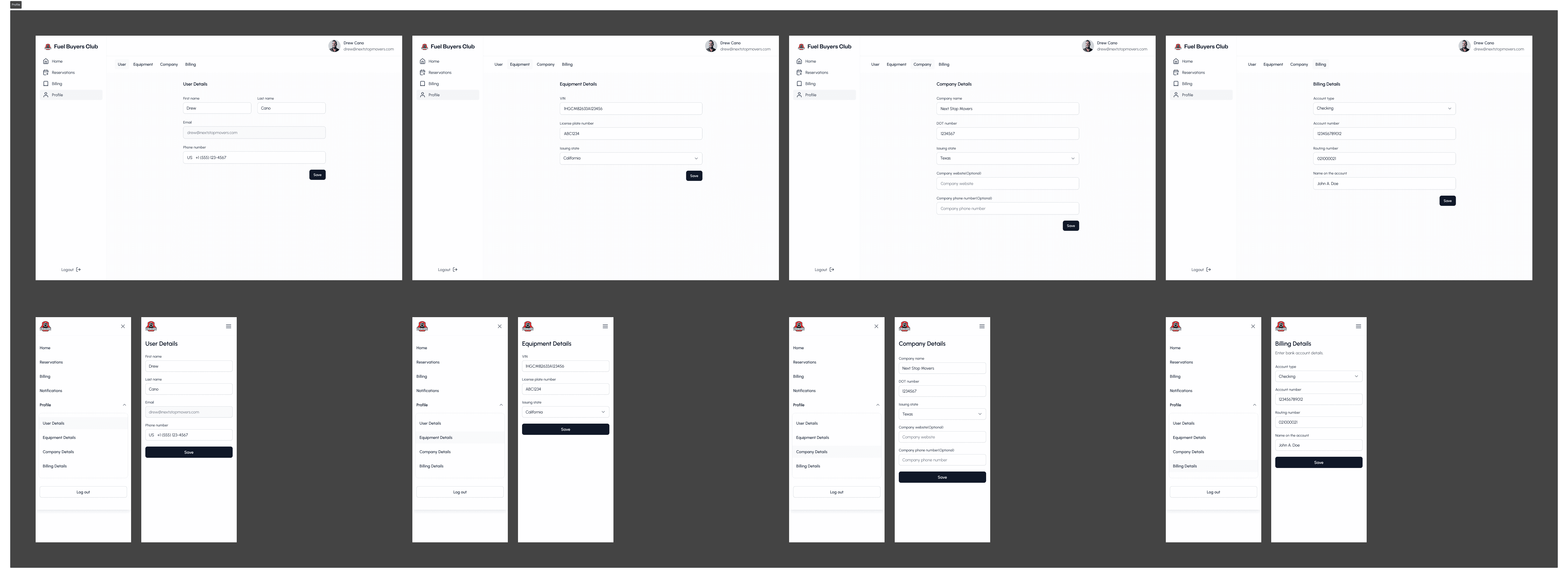
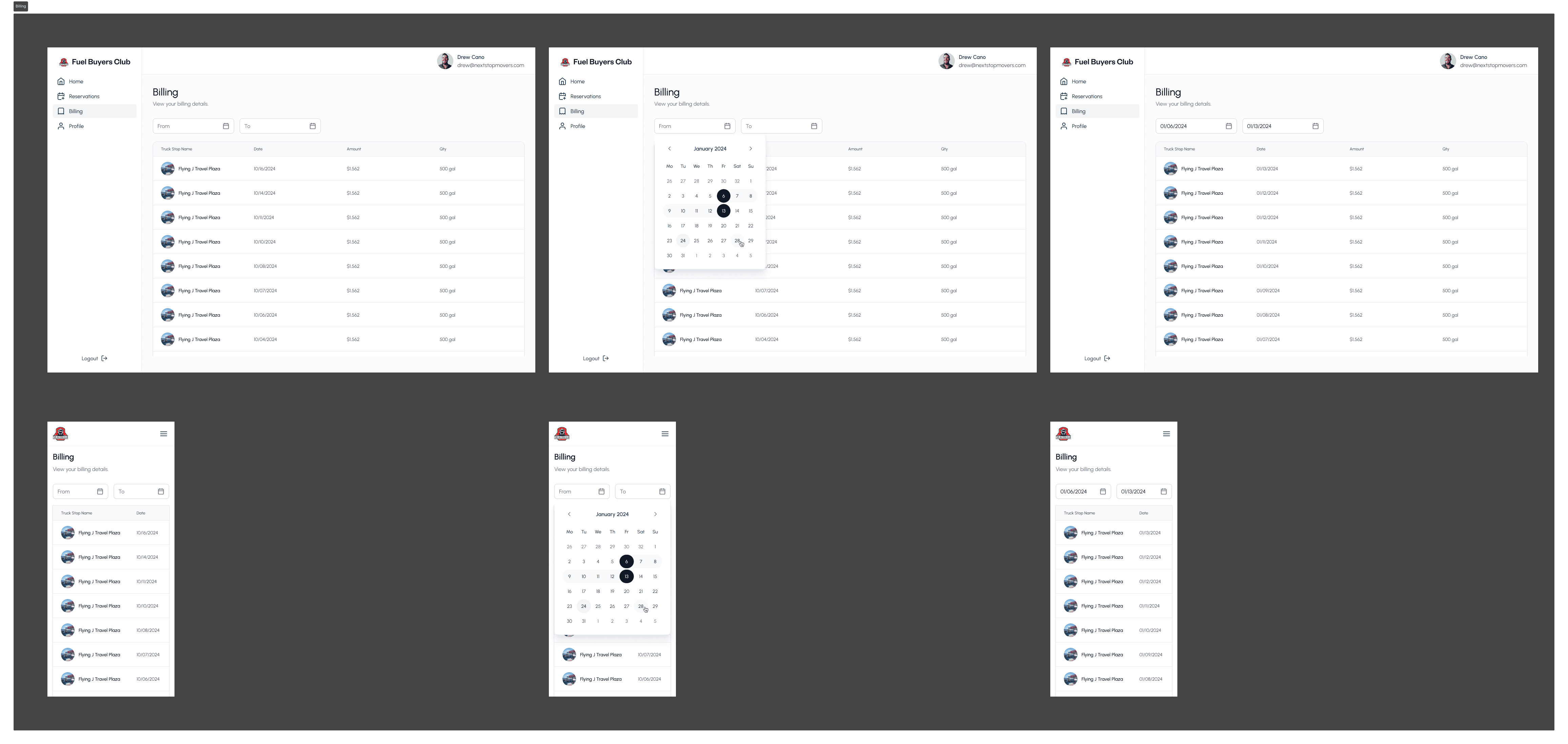
Profile & Billing

Profile & Billing section was designed to give users quick access to their personal and transactional data.

  • Profile Section:
    Displays all the details the user provided during onboarding — such as name, phone number, and vehicle information — allowing them to review and update if needed.

  • Billing Section:
    Shows a chronological transaction history of all completed reservations, including:

    • Date of reservation

    • Truck stop name

    • Amount paid

    • Quantity

Profile & Billing section was designed to give users quick access to their personal and transactional data.

  • Profile Section:
    Displays all the details the user provided during onboarding — such as name, phone number, and vehicle information — allowing them to review and update if needed.

  • Billing Section:
    Shows a chronological transaction history of all completed reservations, including:

    • Date of reservation

    • Truck stop name

    • Amount paid

    • Quantity

Outcomes

The final product provided an enhanced user experience with a clean, intuitive interface. By combining cross-functional collaboration with user-centered design methodologies, the application successfully met the goal of delivering a practical, user-friendly solution. Key results included:

  • Reduced Reservation Time: Streamlined workflows allowed users to complete reservations faster.

  • Enhanced Usability: Positive feedback highlighted improvements in ease of use, especially for older users.

The final product provided an enhanced user experience with a clean, intuitive interface. By combining cross-functional collaboration with user-centered design methodologies, the application successfully met the goal of delivering a practical, user-friendly solution. Key results included:

  • Reduced Reservation Time: Streamlined workflows allowed users to complete reservations faster.

  • Enhanced Usability: Positive feedback highlighted improvements in ease of use, especially for older users.

AUhtentication

Onboarding

Make reservation
past reservations
Profile
Billing
Get in touch

Send a DM and I'll get back to you asap.

Let's build something together!

Crafted with ☕️ and 🎧

Get in touch

Send a DM and I'll get back to you asap.

Let's build something together!

Crafted with ☕️ and 🎧

Lights on·off

Create a free website with Framer, the website builder loved by startups, designers and agencies.